BugForge Write-Up 3/6/2026
- icanhaspii
- Mar 7
- 5 min read
Updated: Mar 8
BugForge Daily Challenge 3/6/2026 - Shady Oaks Financial

Hint: JWT

Note:
If there is an admin account active for a lab, the credentials are admin:admin123
I launched Caido.
I checked to see if there was an admin login using the set/known creds, but there was not.
I created a user account and was taken to a Dashboard which mimicked a real online trading platform:

Following along with the @PawPawHacks/Tom Fieber video walkthrough, over in my Caido proxy window, I found the "POST /api/register" traffic. If you click on that line to highlight it, you can view the Registration “Request” and “Response”:

In that "Response" tab, there should be a "token" value, and that is your JSON Web Token (or JWT):
"token": "eyJhbGciOiJIUzI1NiIsInR5cCI6IkpXVCJ9.eyJpZCI6NCwidXNlcm5hbWUiOiJUZXN0ZXIxIiwicm9sZSI6InVzZXIiLCJpYXQiOjE3NzI4MjEyNzN9.eRBOSnRrSfB2SFOR4XgP90HNBSjctc22-dotZfUZkx0"-@PawPawHacks/Tom Fieber pointed out that that token can be seen in all of our subsequent traffic as the "Authorization Bearer", for example in: "GET /api/stocks".
We can take that token and paste it into a site such as: https://JWTauditor.com. When we do that, we can see among many things, the algorithm in the Header indicating the HS256 algo is being used to sign the token:
Header
{
"alg": "HS256",
"typ": "JWT"
}
-What interests us is the "role" that we see in the "Payload" window:
{
"id": 4,
"username": "Tester1",
"role": "user",
"iat": 1772821273
}

We want to check if the server is actually checking the signature on the token or not. In other words, could we modify these claims in the "Payload" section and have it go through successfully because the server isn't checking. One way we can do this is, still inside the Caido proxy tab, find the "GET /api/stocks" traffic, and highlight that line.
Now, if you don’t already have JWT feature in Caido, you will need to install it as a PlugIn. I believe the free version of Caido allows up to 3 Plugins, any more than that you will need to get the paid version of Caido. To get the JWT PlugIn for Caido:
a) Select “PlugIns” from the lower left-hand side of Caido (under their logo).
b) At the top Menu Bar, choose “Community”.
c) Type “JWT” (without quotes) into the Search Bar.
d) Look for “JWT Analyzer” by Amr Elsagaei.
e) At the bottom of the screen, you may need to select the Disclaimer (at your own discretion).
f) Then hit the “Install” button:

-Now you should be able to utilize the JWT Plugin for Caido. You might need to hit the Plus (+) button to have it populate next to “Pretty” and “Raw”.
In the "Request" window, choose the "JWT" button/view that's from our "JWT Plugin", and then hit the very tiny, red "Send to JWT Analyzer" button:

Once you hit that button, make sure that you are in the "JWT Editor" window, and then paste-in the token:
eyJhbGciOiJIUzI1NiIsInR5cCI6IkpXVCJ9.eyJpZCI6NCwidXNlcm5hbWUiOiJUZXN0ZXIxIiwicm9sZSI6InVzZXIiLCJpYXQiOjE3NzI4MjEyNzN9.eRBOSnRrSfB2SFOR4XgP90HNBSjctc22-dotZfUZkx0Now, hit the "Decode" button:

Next, change the role from "user" to "admin", and hit the "Update Token" button. You should immediately see a "Warning Token updated - Signature is invalid. Click "Sign" button to re-sign the token with a key." Ignore that:

Now, copy the updated token to your Clipboard:
eyJhbGciOiJIUzI1NiIsInR5cCI6IkpXVCJ9.eyJpZCI6NCwidXNlcm5hbWUiOiJUZXN0ZXIxIiwicm9sZSI6ImFkbWluIiwiaWF0IjoxNzcyODIxMjczfQ.eRBOSnRrSfB2SFOR4XgP90HNBSjctc22-dotZfUZkx0Next, go back into the Caido proxy window, highlight the "GET /api/stocks" line, then right-click and select "Send to Replay -> Default Collection":

Over in the "Replay" tab, I hit the "Send" button so that we have a baseline of what the traffic "Response" looks like:

Now, let's paste in our modified/tampered token:
eyJhbGciOiJIUzI1NiIsInR5cCI6IkpXVCJ9.eyJpZCI6NCwidXNlcm5hbWUiOiJUZXN0ZXIxIiwicm9sZSI6ImFkbWluIiwiaWF0IjoxNzcyODIxMjczfQ.eRBOSnRrSfB2SFOR4XgP90HNBSjctc22-dotZfUZkx0Now, hit "Send" and we get an error, which means that the server is actually checking the signature on this token:
{
"error": "Invalid token"
}

Back in the "JWT Editor" window, we can hit the red 'none' Algorithm button. I learned from @PawPawHacks/Tom Fieber that a "None" algorithm Attack essentially sets the "alg" value to none, which basically says it's not assigning anything at all to the token (it's not using anything to sign the token at all):

You will see a big dialog box pop us which explains the attack, and then you want to hit the "Apply Attack" button:

Now, the JWT Token has changed and you want to copy that to your Clipboard (including the trailing dot (period), that's very important:
eyJhbGciOiJub25lIiwidHlwIjoiSldUIn0.eyJpZCI6NCwidXNlcm5hbWUiOiJUZXN0ZXIxIiwicm9sZSI6ImFkbWluIiwiaWF0IjoxNzcyODIxMjczfQ.
Next, head back to the "Replay" tab, make sure you're in "Pretty" view, then paste that token in, and hit the red "Send" button. This time you should NOT see that "Invalid token" error. That tells us that the server is accepting our "None" JWT token:

Now, there's a tool that we can use to help us with our next step. It's a tool by @renniepak and Jason Haddix, but our very own BugForge and AMAZING @PawPawHacks/Tom Fieber has tweaked it! Mr. Fieber has added a "Copy" feature, which I found incredibly helpful! The tool was new to me, so here's my breakdown of how I got it to run seamlessly:
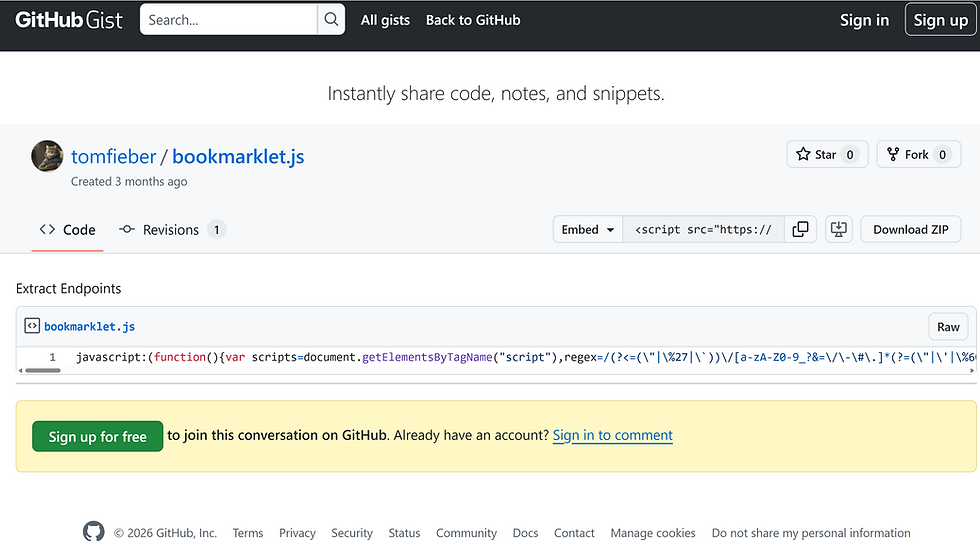
a) Navigate to the @PawPawHacks/Tom Fieber Gist:

b) Click on the "Raw" button, and it should take you to a page of JavaScript code:
Author’s Note: Silly OSINT Easter Egg...From the screen-shot, what is one of my hobbies?

c) Select all of it with your cursor and choose "Copy":

d) Right-click on the upper-right corner of your browser and select "Add Bookmark":

e) Name your new Bookmark (I called mine: "PawPawHacksHaddixUpgrade") and then paste all of that copied JavaScript code right into the "URL" field and click "Save":

f) Now, to use the "Bookmarklet", make sure your browser is at the home page/main page of the app. Once you are there, just click on the new Bookmark, give it a few seconds, and you should see a new window pop-up with a list of Endpoints:

g) Next, all you have to do is click the green "Copy Endpoints" button, and then the blue "Close" button:
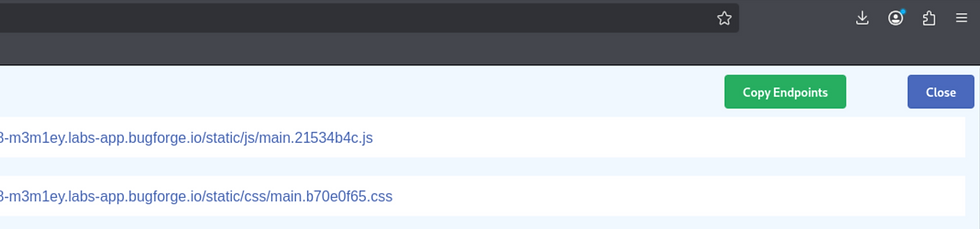
h) Now, just open up a text editor and dump your new list of endpoints out.
i) It's been my experience from being on the BugForge platform for a couple of months now, you want to look through the endpoints for keywords such as: flag, admin, login, etc.

Once you get the Bookmarklet up and running, just copy-out the EndPoints it finds, and you will see that it discovers an endpoint called: "/api/admin/flag".
Now, drumroll please...in the "Request" pane of your Caido "Replay" window, make the following change to the first line of your "Request":
GET /api/stocks HTTP/1.1
to:
GET /api/admin/flag HTTP/1.1
Hit the red "Send" button, and you should see the flag in the "Replay" "Response" pane!!!!!

{ "flag": "bug{********************************}" }
Additional Research:
PawPawHacks/Tom Fieber Bookmarklet Update: https://gist.github.com/tomfieber/9c3da63ab39d0017e7fed752be6d2330 https://www.youtube.com/watch?v=gqg0kb4nQOU&t=279s
##### End of Report #####