BugForge Write-Up 3/25/2026
- icanhaspii
- Mar 25
- 3 min read
BugForge Daily Challenge 3/25/2026 - Gift Lab

Hint: Base64 is interesting.

Note:
If there is an admin account active for a lab, the credentials are admin:admin123
I launched Caido.
I checked to see if there was an admin login using the set/known creds, but there was not.
Next, I created a new user account, and once logged in, the platform behaved a lot like a to-do list site:

I poked around a bit, trying to see everything I could do with the app and generating some traffic to view via the proxy, then I also created a new list.
Next, I noticed that I could share-out my list, so I tried that by selecting the "Created share link" button. I immediately got a notification that my share-link had been created. I couldn't help but notice that it looked a lot like Base64:
Share: bGlzdFdpdGhJZC0=Mg==

6. I threw the b64 blob into CyberChef using the "From Base64" Recipe, and it decoded it as:
listWithId-2

Next, I noticed that if I clicked on the shared link, it showed the b64 blob in the URL:
https://lab-1774482759321-jtpprx.labs-app.bugforge.io/share/bGlzdFdpdGhJZC0=Mg==

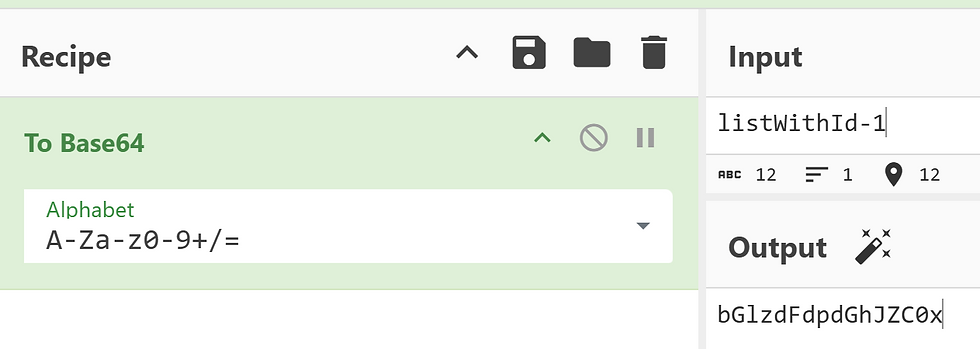
Obfuscation by encoding with Base64 kind of gives a clue that the app designer might be trying to hide something from us. If our user has a listWithId-2, then what happens if we try to decrement that id number by one. We can try that by using CyberChef again…so I opened a new instance of CyberChef and then did the reverse...I pasted-in "listWithId-2" (without the quotes) and then changed it to: listWithId-1.
Next, I chose the "To Base64" Recipe which gave me listWithId-1 encoded in Base64 as:
bGlzdFdpdGhJZC0x
🧠 As a side-note...don't worry, we get the flag in the very next step but remember we're learning things here,,,in case you wondered why the Base64 blob that yields the flag does not have = or == at the end of it, here's an AI overview of why:
🔎 Base64 strings do not always have == or = padding at the end when the original data's length in bytes is an exact multiple of three. The equal signs are used solely as padding to ensure the total length of the encoded string is a multiple of four characters, as required by the standard Base64 encoding scheme.
✅The Role of Padding
ℹ️Base64 encoding works by converting 3 bytes (24 bits) of binary data into 4 characters (each representing 6 bits) of printable ASCII text.
When the total number of input bytes is divisible by 3, no extra bits are left over, and thus, no padding is needed.
The = character is a special padding character and not part of the 64-character Base64 alphabet. It signals to the decoder how many original bytes were in the final, incomplete group.
✅Padding Scenarios
ℹ️The number of padding characters depends on the remainder when the original byte count is divided by 3:
No padding: If the input length is a multiple of 3 bytes, the encoded string will have no = signs at the end.
One =: If there are two spare bytes (16 bits) left over, one = is added to complete the final 4-character group.
Two ==: If there is one spare byte (8 bits) left over, two == are added to complete the final 4-character group.

Now when I put when I put that Base64 encoded blob into the URL bar and hit the “Enter” key on my keyboard, I get the flag!!!
https://lab-1774482759321-jtpprx.labs-app.bugforge.io/share/bGlzdFdpdGhJZC0x

bug{********************************}
##### End of Report #####