BugForge Write-Up 3/10/2026
- icanhaspii
- Mar 10
- 2 min read
Updated: Mar 14
BugForge Daily Challenge 3/10/2026 - Tanuki

Hint: Mass assignment. Can you register as a user with more privileges?

Note:
If there is an admin account active for a lab, the credentials are admin:admin123
Also, my write-up is basically me just following along with the @PawPawHacks/Tom Fieber video walkthrough. I found the following quote from him really helpful:
>>This is a mass assignment lab, so basically what mass assignment means is that the value of a request parameter gets bound to a field on an internal object. So say for example you are registering a new user on a site, and within that application the user object has a field or an attribute that is admin that is set to false by default. Now, if you were able to send your registration request with a parameter in the request "is admin true", and that got bound to the "is admin" field on the user object that gets created, that is a mass assignment vulnerability.<<
I launched Caido.
I checked to see if there was an admin login using the set/known creds, but there was not.
I created a new user account, and once logged in, the app appeared to be a flash-card style study aid:

I pivoted over to my Caido proxy tab, and saw that my POST request to:
"/api/register" had a role field that was set to "user" by default:

Next, I highlighted that line and right-clicked and selected, "Send to Replay -> Default Collection":

Moving over to the Caido "Replay" tab, I hit the red "Send" button so that I would have a baseline of what the traffic "Response" looked like and I see that I got back the following error, which did make sense:
{
"error": "Username or email already exists"
}

Now, I replace the "username", "email", "full_name", and "role" field values with data from a fake user account, but this time changing the "role" to "admin", like follows:
{
"username":"Tester1",
"email":"Tester1@aol.com",
"password":"Password",
"full_name":"Tester One",
"role":"user"
}
to:
{
"username":"FakeUserName",
"email":"Fake@Email.com",
"password":"Password",
"full_name":"FakeName",
"role":"admin"
}
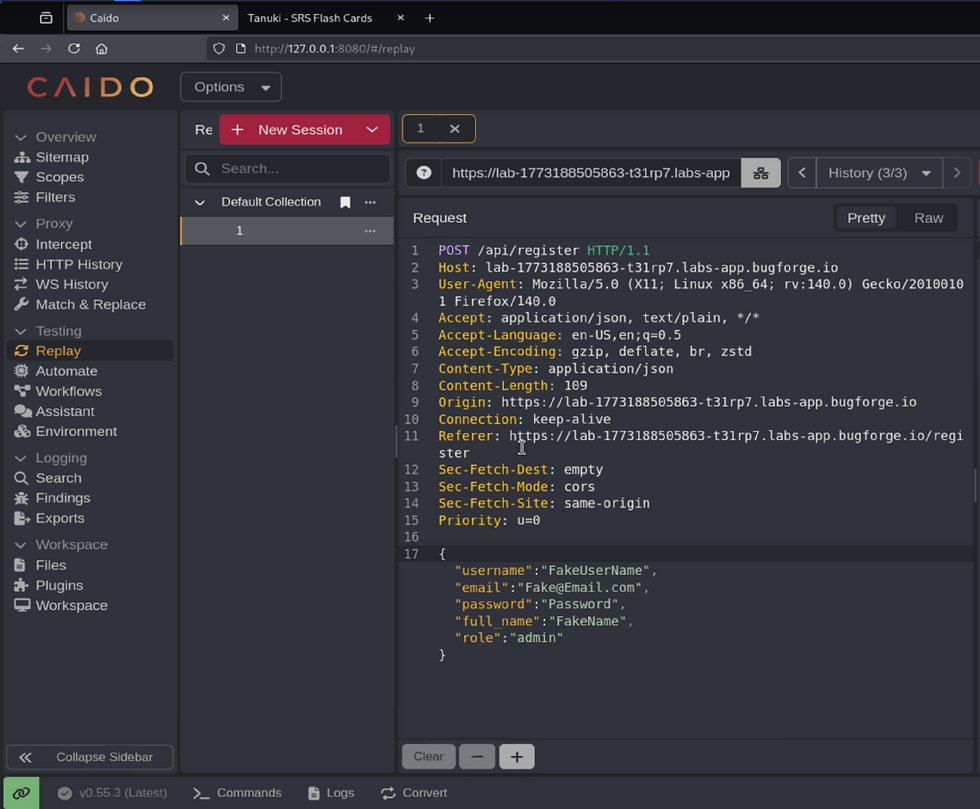
Next, still in the “Replay” tab, I hit the red "Send" button and then over in the "Response" pane, I saw that the new fake user had been created, and was given the role of "admin" (which we set):

Next, I opened a "New private window" in my browser, and logged in as that new fake user that I just created:

Once logged in as the new fake user, I saw in the upper-right-hand corner of the browser window that there was a new menu button called, "Admin":

I clicked on that "Admin" button and got back the flag!!!

bug{********************************}
##### End of Report #####